
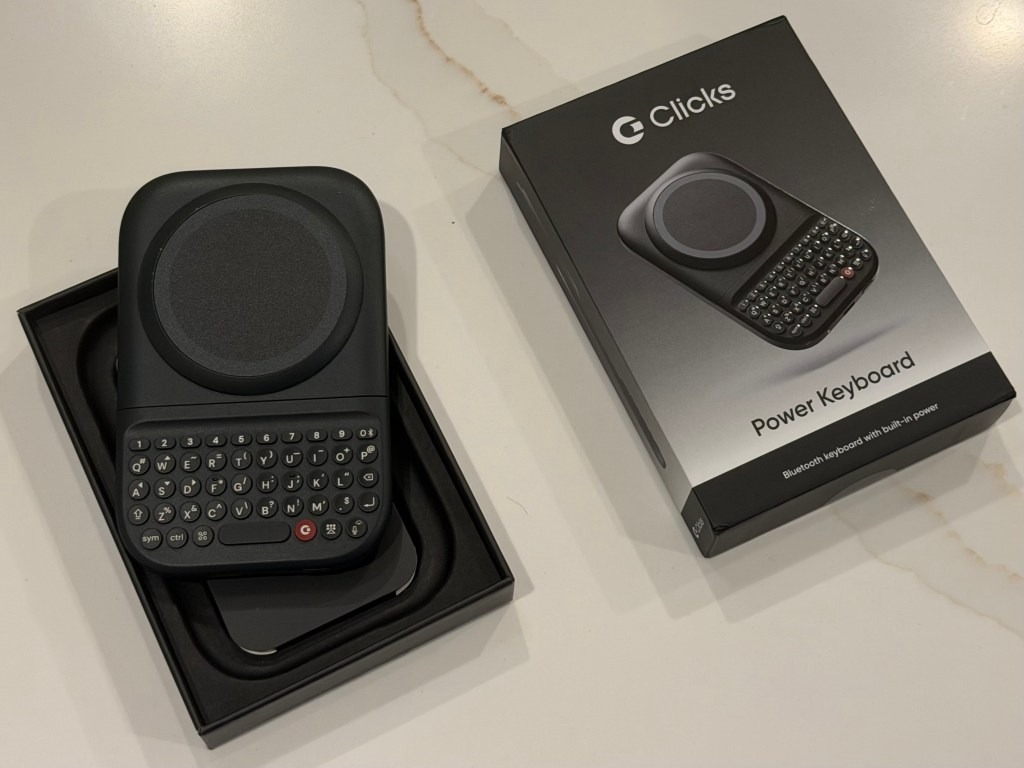
In an era dominated by sleek, glass-slab smartphones, a persistent subculture of mobile users still yearns for the tactile click of physical buttons. Enter Clicks Technology, a hardware startup that has made it its mission to bring tactile typing back to the modern smartphone landscape. Following a series of manufacturing and logistics delays, the company recently began shipping its $99 MagSafe-compatible Power Keyboard. According to the company, approximately three-quarters of the initial batch of pre-orders have successfully made their way to eager consumers. This slide-out accessory promises to transform modern touch-screen devices into retro-inspired typing powerhouses, mimicking the legendary physical keyboard experience of the classic BlackBerry. However, as with any hardware bridging two distinct eras of design philosophy, the Power Keyboard comes with its own unique set of physical compromises.
A Brief History of the Physical Keyboard Revival
To understand the market positioning of the Power Keyboard, one must look at the historical trajectory of mobile input methods. The late 2000s and early 2010s marked the rapid decline of physical keyboard pioneers like BlackBerry and Palm, as Apple's iPhone and subsequent Android devices normalized the virtual capacitive touchscreen. While touchscreens offered unprecedented display real estate and adaptability for media consumption, they sacrificed the blind-typing accuracy and satisfying sensory feedback that tactile keys provided. Over the years, several companies attempted to bridge this gap, most notably the Typo keyboard case in the mid-2010s, which ultimately faced fatal legal challenges from BlackBerry over design copyright infringement.
Clicks Technology entered this niche market with a fresh perspective, launching its first product: a unibody keyboard case that wrapped around the iPhone. While that initial effort proved that there was a dedicated audience for physical keys, it also highlighted significant design challenges, such as dramatically increasing the physical height of the phone and draining the host device's battery directly via its physical connection. The new Power Keyboard represents a major iterative step, utilizing a slide-out mechanism rather than a static extension. Furthermore, this accessory serves as a strategic stepping stone for the company's ultimate goal: the launch of the Clicks Communicator, a dedicated physical-keyboard smartphone slated for release later this year.
Design, Form Factor, and the Setup Experience
The Power Keyboard arrives in premium, high-quality packaging, complete with protective peel-off films and a detailed quick-start manual, signaling the company's intention to position this as a premium accessory. Out of the box, the device feels sturdy and well-crafted, measuring 119.7 × 76.6 × 15.2 millimeters and weighing 180 grams. It connects to smartphones magnetically using Apple’s MagSafe standard or the newer Qi2 wireless charging standard. For users whose devices lack built-in magnetic arrays, the keyboard can still be utilized via adhesive magnetic rings or compatible third-party cases.
The sliding mechanism is a standout feature, collapsing behind the phone when not in use and extending outward with a satisfying mechanical snap reminiscent of classic slider phones like the T-Mobile Sidekick. Thanks to its adjustable slider brackets, the keyboard can accommodate a wide array of phone sizes, ranging from standard base models to oversized flagships like the iPhone 17 Pro Max or the Google Pixel 10 XL. It can also be operated in both vertical (portrait) and horizontal (landscape) orientations, offering flexibility for different types of work.
Setting up the device involves a Bluetooth pairing process that can occasionally trip up multi-device users. To connect the keyboard, users must hold down the power button and slide the keyboard open. While pairing with a primary Android or iOS device is straightforward, transitioning between different operating systems requires a specific sequence. To add a secondary device, users must press a designated number key simultaneously with the power button. To completely unpair or "forget" a host phone, users must access the dedicated Clicks companion mobile application rather than relying solely on the phone's native Bluetooth settings.
Typing Feedback, Backlighting, and Software Integration
Once configured, the typing experience is remarkably polished. The keys are well-spaced and offer a distinct, tactile resistance that virtual keyboards simply cannot replicate. While users accustomed to typing on glass will face a brief learning curve, the physical layout is intuitive, and muscle memory quickly adapts. The circular keys are designed to prevent accidental double-presses, and the layout feels optimized for thumb typing. For low-light environments, Clicks has integrated an adjustable LED backlight, ensuring readability during night flights or in dimly lit rooms.
The software integration via the Clicks companion app elevates the keyboard from a simple input device to a productivity tool. The keyboard features a dedicated "Clicks" key, which can be mapped to perform various shortcuts, such as acting as a traditional Tab key. Additionally, users can activate "Cursor Mode" by pressing the Symbol and Command keys simultaneously. This turns a subset of the letter keys into directional arrow keys, allowing precise navigation through text documents without needing to touch the screen—a feature highly appreciated by mobile writers and editors.
Power Management and Dual-Purpose Functionality
Unlike its predecessor, which relied on the host smartphone's battery, the Power Keyboard features its own integrated 2,150 mAh battery. This independent power supply ensures that the accessory does not compromise the phone's daily battery life. In fact, the device can double as a portable wireless charger, transferring power from its internal cell to the host phone via MagSafe or Qi2.
Through the companion app, users can customize how this power is distributed. If a user wants to prioritize typing longevity, they can completely disable wireless power transfer, reserving all 2,150 mAh exclusively for the keyboard and its backlight. Alternatively, they can allocate a specific percentage of the battery to charge their phone, keeping a small reserve to keep the keyboard operational.
Navigating the Ergonomic and Practical Compromises
Despite its premium build and clever engineering, the Power Keyboard is not without its drawbacks. The primary challenge lies in weight distribution. When fully extended in portrait mode, particularly with heavier flagship phones, the combined unit becomes distinctly top-heavy. This shifts the center of gravity away from the user's hands, causing hand fatigue during prolonged typing sessions.
Portability is another area of concern. Adding 180 grams of weight and over 15 millimeters of thickness to a smartphone makes for a bulky pocket presence. The physical dimensions make it virtually impossible to carry comfortably in standard pockets, particularly in tighter apparel. Furthermore, there is a risk of the keyboard accidentally sliding open when being pushed into or pulled out of a pocket too quickly, potentially causing wear and tear on the sliding tracks.
Market Viability and Cultural Nostalgia
The launch of the Power Keyboard highlights an interesting trend in consumer technology: the monetization of nostalgia combined with a genuine desire for tactile productivity. While mainstream smartphone manufacturers continue to push for bezel-less screens and virtual interfaces, a dedicated niche of professionals, writers, and tech enthusiasts still values tactile efficiency.
From a market perspective, the $99 accessory serves as a low-risk testing ground for Clicks Technology. By releasing a universal keyboard accessory first, the company can gauge consumer interest, refine its hardware manufacturing processes, and build brand loyalty ahead of its ambitious smartphone release. While it may not replace virtual keyboards for the average consumer, the Power Keyboard offers a compelling, highly functional alternative for those who view physical keys not as a relic of the past, but as an essential tool for modern mobile productivity.